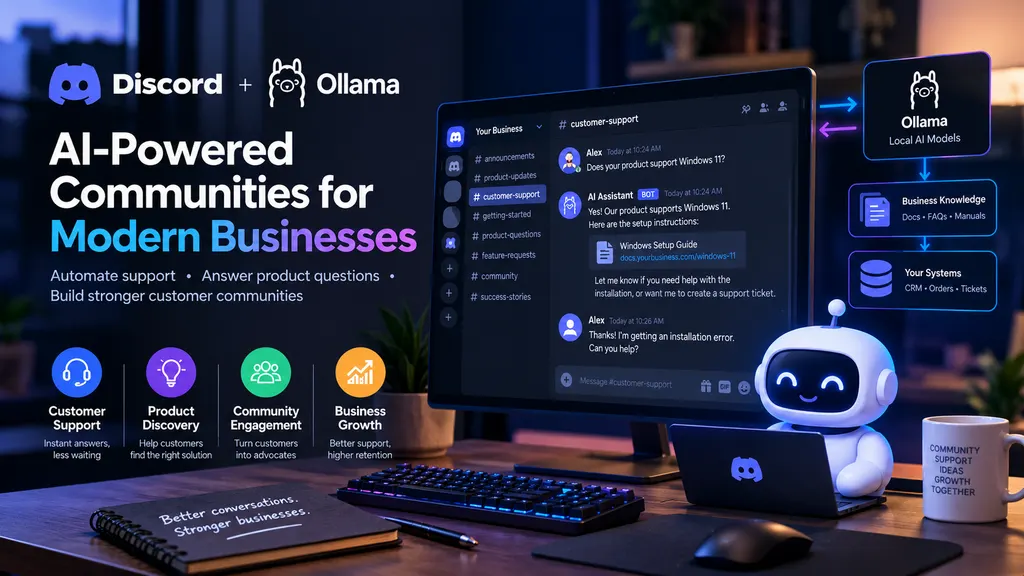
Picture a customer asking a question, getting product advice and reporting a fault in the same conversation, at the speed of chat.
Two technologies make that work: Discord bots and Ollama.
Discord started life as a gaming hub. Today businesses use its channels, roles and bots to run several communities at once, while Ollama makes large language models (LLMs) available for local hosting or connects them to supported cloud models. Together they give you an AI assistant for customer support that also takes weight off the daily queue.
For a startup or a software house, that turns support into a community customers want to stay in.
1. Why should businesses consider Discord?
People still associate Discord with video games, but the feature set runs well past gaming.
A developer can open and moderate a channel for product support, troubleshooting and feature requests. As the newsroom notes, Discord has over 90 million daily active users (as of Q4 2025). That figure suggests a large potential audience, but it does not mean any business will see the same success on the platform.
Possible use cases for the business
Software houses: product announcements, bug reports, questions, feature requests.
E-commerce: product questions, announcements, recommendations.
Automobiles: community around car models, access to events and accessories.
Educational businesses: student support, course assistance, resources.
SaaS companies: onboarding processes, documentation search, troubleshooting, feedback.
Local businesses: customer forums, news, bookings.
Frequently Asked Questions: the goal is a conversation-driven experience where customers bring the questions, not the business. An engaged group of enthusiasts helps, but keep the channel delivering value instead of turning it into another marketing surface.
2. What is OLLAMA, and why is it important?
Ollama aims to simplify hosting supported models on a developer’s infrastructure, where they can serve application backends or connect to the cloud. That means a business does not have to call a third party’s API for every request. A company can host a supported model on its own servers and reuse it across several applications.
Teams use Ollama to experiment with AI assistants and recommendation engines, and to answer support questions, search internal documentation and retrieve knowledge about business-specific concepts.
The advantages of local AI
More control over the data: prompts and output still travel to Ollama’s model, but you can arrange the setup so that all of the data stays inside your own infrastructure.
Lower usage costs: a model you host yourself can cost less than an API you call thousands of times a month, especially with larger language models that charge higher rates per token. Infrastructure, electricity and maintenance add to that bill, so run the numbers before you commit.
Access to business-specific knowledge: an application can use Ollama to retrieve relevant parts of the documentation or policy guides. As long as the model contains the right information, it supports customers and employees in their work.
Flexibility and variety of use cases: Ollama comes with an API that lets you call it from different programming languages, which makes it usable across several applications. The area is still experimental, so pick the LLM architecture once you understand the requirements and use cases.
Local AI is not automatically more secure. You still have to configure and guard every component (the database, the application, the hosting infrastructure). Use customer data only with consent, and never in a way that shares personal information or trains on it.
3. How can Discord bots and Ollama work together?
Need a website built properly?
Fast, modern, fully owned — from ₹7,999, delivered in 1–2 weeks.
Chat on WhatsAppSee pricingA bot in Discord can relay a customer request to a local AI model and receive a response. An example shows the shape of it.
A customer asks whether a product works with Windows. The bot pulls the relevant instructions using Ollama’s document search and RAG capabilities, sends them to the model, gets back a confirmation plus a link to the setup guide, and relays the answer to the user.
The boundary matters more than the demo. The bot answers from documents you approved, so it can quote the installation guide but cannot invent a delivery date, and when a request falls outside that set it opens a ticket and hands the conversation to a person.
General architecture
Customer in Discord
  --> Discord Bot
      --> Validate Request and Permissions
          --> Retrieve Approved Business Knowledge
              --> Ollama Local AI Model
                  --> Validate and Format Response
                      --> Reply in Discord
          --> Support Ticket or Human Handoff
Treat the model as an enhancement to the support process. Pricing, stock and availability keep coming from the relevant systems of record.
Note: This is not a complete architecture. The model can live anywhere the bot can reach it, across multiple machines, VMs or infrastructures.
Sample user interaction
Customer: Does your product support Windows?
AI bot: Based on the documentation, the software is compatible with Windows 11. Please refer to the guide in our instructions to complete the software installation. Would you like the link to the assistance documentation?
Customer: I am getting an error during the installation.
AI bot: I can assist you with troubleshooting the error. Please share the error message (do not include personal details or credentials), and I will help you resolve this. Otherwise, I can create a customer ticket for assistance.
That exchange goes further than a simple Hi, how can I assist you bot.
4. Discord as a first point of contact
Most businesses treat their website as the main marketing and conversion channel, and it usually carries the important information about the business and how to get in touch. Adding Discord on top of that tells you a lot about what customers actually want.
Take a software startup selling an application. The website does discovery and marketing. A customer explores the offering there, jumps into the company’s Discord community, asks questions, tries the product, hits an issue, and becomes a paying customer. The same community shows the company what customers need next.
A sample purchase path runs like this:
-
Discovery: the customer learns about the business and what the product does, via the website or other channels.
-
Connection: the customer signs up for the Discord community and receives instructions to access the invitation link. Note that this is usually gated, and a customer will need to sign up for a moderation review.
-
Assistance: the customer engages in an informational dialogue with the bot, learning the basics of a product or service.
-
Evaluation: the customer has the information they need and is considering placing an order or requesting a quote.
-
Conversion: instead of using a contact form or email, the customer follows a documented conversion path, for example a pre-approved, tracked landing page.
-
Retention: the customer keeps receiving general information about the product and gets help with specific instructions.
-
Feedback: the customer uses the community and its channels to tell the company what to fix.
-
Engagement: the business uses that input to improve its offerings, talk to customers peer to peer and keep the conversation going.
Treat the Discord community as an extension of the audience you already serve, not a separate channel. It works as a help desk and as a discussion forum about the subject at the same time. When customers answer each other and share what they know, that becomes a real differentiator against competitors.
Discord only works if your audience already uses it. Never push it on customers as a replacement for email, WhatsApp, phone or the website. Make it optional and useful, and it earns its place.
The channel that survives has a narrow, obvious job: documentation search, release notes, or a place to report a bug. A general chat channel with no purpose competes with email and loses, because switching to another app costs the customer more than typing one line into the inbox they already have open.
5. Business stats: The significance of the numbers
Reading one statistic in isolation always misleads, but the data below gives a sense of scale.
| Statistic | Current result | Implication |
|---|---|---|
| Discord daily active users | 90M+ (Q4 2025) | Large potential audience exists |
| Game communities in Discord | 10,000+ (Dec. 2025) | There is a rich opportunity space |
| Combined members of game communities in Discord | 80M+ (Dec. 2025) | Opportunity space has breadth and depth |
| Median increase in game launch days for linked players | +25% | Engagement mechanics can increase days played in studied games |
Sources:
Note: these statistics cover game-playing communities and come from specific methods. They cannot promise that a generic business launching a community would see similar results.
Source: Discord internal data, as reported by the company’s official newsroom. The 90 million is a lower-bound headline figure rather than a statistical value.
Interpretation: you do not need a large audience to succeed. A small group of relevant customers who actually engage can be worth far more than a large group of uninterested people.
6. Practical applications
An AI bot in the Discord community handles tasks from the very simple to the highly complex.
A. Customer support automation
The assistant pulls information from approved channels: documentation, instructions, guides. It answers frequent questions from product knowledge, or retrieves the right document for an unusual query. The customer gets the same instructions an agent would paste, without waiting for the next working day. That cuts the repeat questions and the misunderstandings that come with them.
B. Product discovery and recommendations
A question about one product turns into a short list of recommendations. The bot keeps the customer talking, learns what they need and suggests products that fit what they described.
C. Lead qualification
The bot asks a new prospect what they want, stores the answer in an appropriate data structure, qualifies the lead against the given requirements and budget, and forwards it to the sales team.
D. Feedback and feature requests
The assistant gathers feature suggestions and product feedback, then shares them with product development, project management or customer success. With the right tools in place it also collates them, which makes analysis and recommendations easier.
E. Internal team assistance
Give employees a private server where an assistant answers frequent internal questions and pulls up documentation, process notes and product detail. That keeps the same answers circulating inside the company instead of sitting in individual inboxes.
F. Booking assistance
With appropriate tokens and authentication, a bot can direct a customer to a booking page, retrieve the relevant information for an order, or report the status of the customer’s current support ticket.
Note: guard any action that touches personal or sensitive data, rather than relying on simple username authentication.
7. An example: A business software application
Take a small company selling a business application on a subscription model. With the tools in this article it could build the following community.
The company sets up these channels: #announcements for product news, #getting-started for onboarding instructions, #customer-support for troubleshooting, #feature-requests for feature suggestions, #community for general conversation and #contact-the-team for support and sales.
A Discord bot answers documentation questions and creates tickets when a user needs more help, which leaves the support team free to handle the harder problems. The bot also keeps the answers consistent, because every customer reads the same approved text instead of whichever reply an agent had time to type. Treat the value of that setup as a hypothesis until you have a prototype, then measure it.
8. Potential efficiencies for the business
No rule of thumb predicts what an assistant like this will save you. The target audience and its engagement decide part of it, and so do the complexity and accuracy of the model underneath plus the technical and business skill of the people running it.
A set of sample assumptions still shows the method.
Say a business takes an average of 1,000 support requests a month, 40% of them suit the bot, and the bot resolves 70% of those.
1,000 Monthly Requests
  --> 400 Suitable for Automation
        --> 70% Successfully Resolved
              --> 280 Automated Resolutions
              --> 120 Escalated to Staff
  --> 600 Other Requests
You can extrapolate from there, for example by calculating the financial effect of resolving some of those requests.
Note: the diagram leaves out the 60% of the remaining 600 monthly requests that stay unhandled. Audience demand shapes the outcome.
One formula gives you the financial estimate:
Estimated monthly net benefit = automated resolutions x average handling cost per request minus monthly operating costs
Use real operating costs in that calculation. That depends on how you implement the solution, which resources it consumes (hosting, electricity, model maintenance) and which business costs it adds, extra support staff for instance. Feed in your own handling cost and the same arithmetic tells you whether the assistant pays for its hosting.
9. A practical technology stack for implementation
The build does not have to be complex. One way to start:
| Element | Sample choice | Task |
|---|---|---|
| Community | Discord | Hosts customer relations |
| Bot back-end | Python or JavaScript | Provides basic commands and permissions |
| AI engine | Ollama | Language model inference |
| Knowledge base | SQLite or PostgreSQL | Stores FAQs and metadata-related knowledge |
| Search system | Keyword or vector search | Finds the relevant knowledge |
| Business application | Current APIs | Processes requests and tickets |
| Performance and security | Application logging and monitoring | Debugging and performance tuning |
Note: at small scale either Python or JavaScript works, depending on team competency and the integrations you need.
A retrieval augmented generation (RAG) system helps here. The model uses documents to find the relevant information before it answers, which keeps the response accurate without training the model to know every detail of the subject. The document set stays yours as well: change a policy page and the next answer reflects the change, with no retraining step in between.
Accuracy and effectiveness will always depend on the data you use to train or enhance the model.
10. Limitations and security considerations
AI augmentation should make support faster and better, and never turn into a generator of incorrect information. Design for that from the start.
- Hallucinations: restrict the model to documents that are approved and accessible.
- Privacy: keep personal information out of the model unless you explicitly authorise it and protect it.
- Access control: show user-specific information only when the user has permission for it.
- Human oversight: give the model a fallback when it lacks confidence, such as escalating the ticket to a human agent.
- Discord rules: use the official APIs for bots and follow Discord’s rules on access to this type of data. Check the most recent documentation on permission requirements for specific data.
- Availability: the model runs only as well as the computer under it, and a home PC rarely makes a good server.
- Performance: model and hardware change both response speed and accuracy a great deal.
- Audience: always keep an alternative route open for customers who do not use Discord.
According to Ollama’s privacy policy, Ollama cannot see prompts and responses that you process locally, apart from the context and parameters. Take further precautions so the model cannot reach data it should not see, and secure the application itself wherever you host it.
11. A simple roadmap for the business
You can run this in phases. Start as simply as a small customer community on Discord, then add a bot once testing and validation give you evidence, then bring in local AI to improve the results further.
Implementation Stage 1: Minimum viable product
Stand up the minimum viable product in Discord: the essential servers, channels, a rules page, roles, FAQs.
Implementation Stage 2: Enhanced engagement
Build the bot and ship the essential commands, such as /help, /docs, /product and /contact, then test them before wider adoption. Watch which commands people actually use for a fortnight before you add more.
Implementation Stage 3: Value expansion
Run a proof of concept: connect the bot to Ollama, retrieve relevant documents to improve the experience, and keep the human support option ready to de-escalate complex or sensitive requests. Add the business system integrations only once the basic system is stable.
Begin with a clear vision and stay flexible enough to change it as new information arrives. In practice that means starting with one specific use, such as documentation assistance, and expanding only as the improvement becomes evident.
Tags
#discord bots#ollama#local ai#business automation#customer support#ai chatbots